¶ Vulnerability Reports and Exports
A vulnerability report in the RedRays Security Platform can be read in the console, downloaded as an HTML document ordered by severity or by host, downloaded as CSV for analysis, or pushed out as one ticket per finding into an external tracker.
Those five destinations divide into two groups that behave very differently, and the difference is worth knowing before a menu item is pressed.
¶ What can a report be exported as?
| Export | What it produces | Where it goes |
|---|---|---|
| HTML by severity | A rendered report with findings ordered worst first | A file in your browser |
| HTML by host | The same report ordered by host, and identical in every other respect | A file in your browser |
| CSV | The report's findings as a table | A file in your browser |
| Jira | One issue per finding on the Jira instance this installation is configured against | An external system |
| ServiceNow | One incident per finding on the ServiceNow instance this installation is configured against | An external system |
The first three read the local database and hand the browser a file. Nothing leaves the installation. The last two create records on a system outside it, one per finding, on the press of a menu item, with no preview of what will be created and no undo. On a report with twenty findings, that is twenty tickets. Decide who is allowed to press them before anybody needs to.
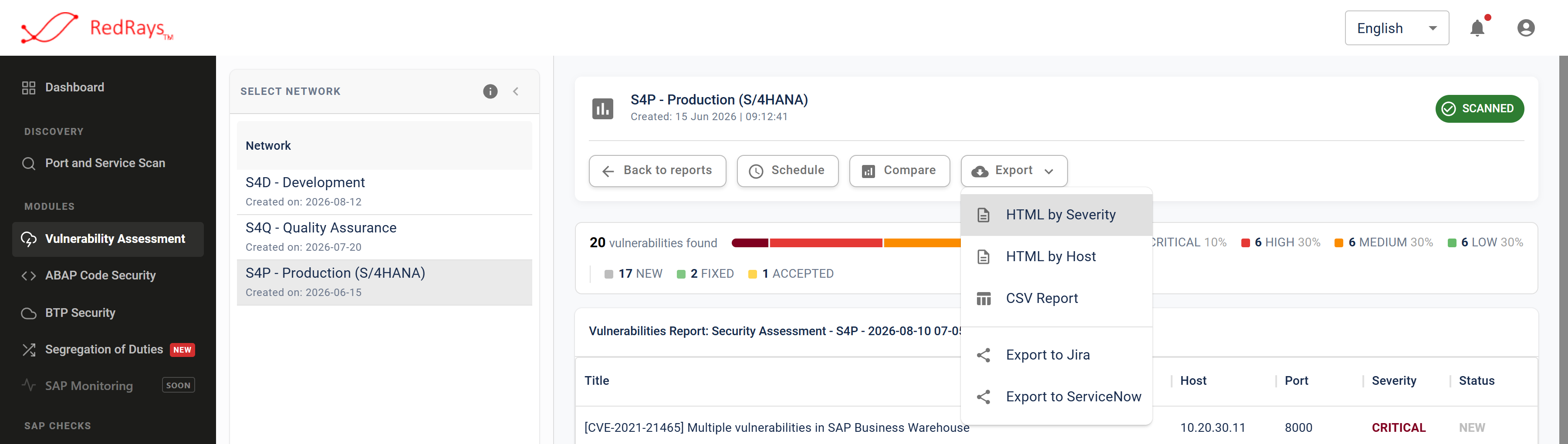
The file downloads and the tracker exports sit in one menu, and pressing either is a single action with no confirmation step.
¶ Which export suits which reader?
For an engineer working the landscape, the console itself, and the request log on an individual finding, which shows exactly what question the check asked. The finding gives the host, the instance, the port, the service, the description, the solution and the SAP note references where the issue has one.
For an auditor or a report pack, the HTML export ordered by severity, kept alongside two things the report does not carry: the date of the service inventory it was routed by, and which services had a stored logon at the time. Those three together are a defensible statement about coverage. See what a clean report does not say.
For analysis or a spreadsheet-driven remediation plan, the CSV. Group it by the issue behind each finding rather than counting rows, because one issue on two ports is two findings and a row count is a count of places measured.
For a work queue, the tracker export. It is also the practical answer to something the capability deliberately does not hold: a finding records a status and a severity and nothing about who decided or why, so the ticket is where the owner, the reason and the date should live.
¶ What is in an exported report?
The findings of one scan, with their location, their title and prose from the check catalogue, the two published severity ratings, and your recorded status and severity. Exports carry findings in every status, so a finding somebody accepted is in the file, marked as accepted, rather than removed from it.
¶ What exports do not do
- They do not preview. The tracker exports create records immediately, per finding, with no list of what is about to be written.
- They do not deduplicate. Findings for one issue on several ports become several tickets, because that is what the report holds.
- They do not carry evidence of a response body where the check did not capture one. The file says so rather than showing an empty box as a result.
- They do not update a ticket that already exists for the same issue from a previous scan. Each export is a fresh set of records.
- They are not a scheduled feed. An export happens when somebody asks for it.
¶ Related pages
- SAP vulnerability assessment, the capability these reports come from
- What one vulnerability finding says, for what each exported row holds
- Published severity against recorded status, for the values an export carries
¶ Frequently asked questions
¶ Can I export several reports at once?
Export works on one report. To show change over time, use the comparison view, and read the caveats on repeat scans and comparing reports before charting a trend for somebody else.
¶ Do the HTML and CSV exports leave our network?
No. They are generated by your installation and downloaded by your browser. Only the tracker exports contact a system outside it, and only the one you configured. See deployment and where data goes.
¶ Can I stop somebody from creating a hundred tickets by accident?
Control it with access to the console. The menu offers the tracker exports beside the file downloads, and pressing one is a single action with no confirmation step.
¶ Does an export include findings we marked fixed?
Yes, with the status on them. A report is a record of what one scan found, and triage is recorded beside it rather than removing rows from it.