¶ SAP Profile Parameter Review
A profile parameter review in the RedRays Security Platform reads the SAP instance profile parameters that decide how a system authenticates users, exposes its gateway and protects its connections, and reports each one whose value deviates from a recommended setting.
- Reads only, never writes
- One row per catalogue parameter
- Unmeasured is never a pass
Instance profile parameters are the switches an SAP system obeys before any custom code runs and before any authorisation is checked. How long a password has to be. Whether anyone is ever made to change it. Whether the gateway will start an external program on request, and whether it writes down that it did. Whether debugging is reachable over Remote Function Call (RFC). Whether an encryption library is configured at all. None of these is a defect in software SAP wrote, so no patch day changes them. They were set on this system, often years ago, frequently by copying a profile from another system, and they stay set until somebody looks.
¶ What is an SAP profile parameter?
An SAP profile parameter is a named setting in an instance or default profile that configures the behaviour of an SAP application server, such as login/min_password_lng or gw/reg_no_conn_inf. Parameters are read by the kernel at start-up, some can be changed dynamically, and every one of them has a value in force that may come from a profile file or from the kernel default when no profile sets it.
Administrators normally look at them one at a time in transaction RZ11, which answers about the name you type and says nothing about the name you forgot to type. That is the gap this review closes: it asks about a fixed list of security-relevant parameters every time, on every system, in the same order, and records what came back.
¶ What does the review check?
The review works from a catalogue of security-relevant parameters, each with a condition describing the value it expects. The catalogue ships with the product and covers, among others:
| Area | What the parameters in it decide | Representative parameters |
|---|---|---|
| Password policy | Minimum length, expiry interval, history depth, how long an initial password stays usable | login/min_password_lng, login/password_expiration_time, login/password_history_size |
| Session and logon | Whether an idle session is closed, and which users bypass a check | rdisp/gui_auto_logout, rdisp/auth_check_user_list |
| Gateway | Whether external programs may be started remotely, whether registered servers are checked, whether attempts are logged | gw/rem_start, gw/reg_no_conn_inf, gw/tcp_security, gw/logging |
| RFC and debugging | Whether debugging is reachable over RFC | rfc/ext_debugging |
| Encryption | Whether Secure Network Communications is switched on and which library it uses | snc/enable, snc/gssapi_lib |
| Authorisation switches | Whether a global authorisation check has been turned off | auth/no_check_on_tcode, auth/system_access_check_off |
| Interfaces and front end | Scripting, detailed error output, batch input recording, listener configuration | sapgui/user_scripting, is/HTTP/show_detailed_errors, bdc/shdb/auth_check |
The catalogue is readable inside the product, condition and all, and it can be added to. Where the recommended values come from is what that means for a result you are about to hand to an auditor.
Everything the system returns that the catalogue does not ask about is discarded. A report tells you how much of its own list it filled in, not how many parameters the system has.
¶ How does the review read the values?
It opens one read-only RFC connection to the SAP system, asks for the profile parameters in force, and closes it. Nothing is written to the SAP system, no business data is read, no user or role is read, and no port is opened. What comes back is compared against the catalogue on the customer's own installation, and the report is stored there. See what one parameter check says for the access the read needs and the record it leaves behind.
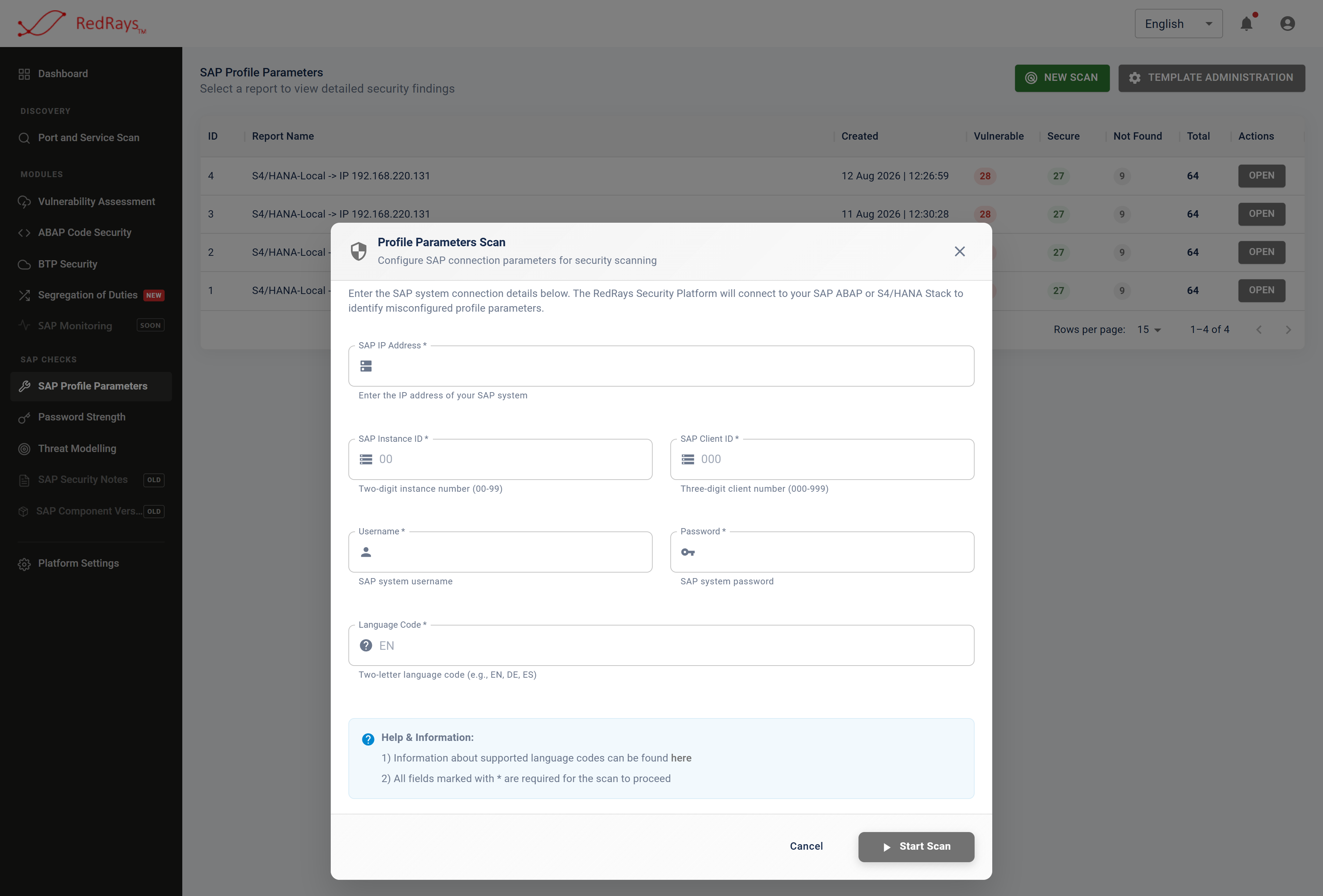
A review is pointed at one system and asks for nothing beyond the connection it needs to read the parameters once.
The whole conversation with the SAP system is one connection, one call and a disconnect. Nothing is written, no transaction is executed, and no user, role or business data is read.
¶ What does one result look like?
Each parameter in the catalogue produces exactly one row in the report, and that row is in one of three states.
| State | What it means | What the report shows |
|---|---|---|
| Secure | The parameter was returned by the system and its value satisfied the expected condition | The value SAP returned, beside the condition it satisfied |
| Vulnerable | The parameter was returned and its value did not satisfy the condition | The value, the condition, and the recommended remediation |
| Not Found | The parameter was not among those the system returned, so no comparison was made | The parameter name, marked as unmeasured, with no verdict and no remediation |
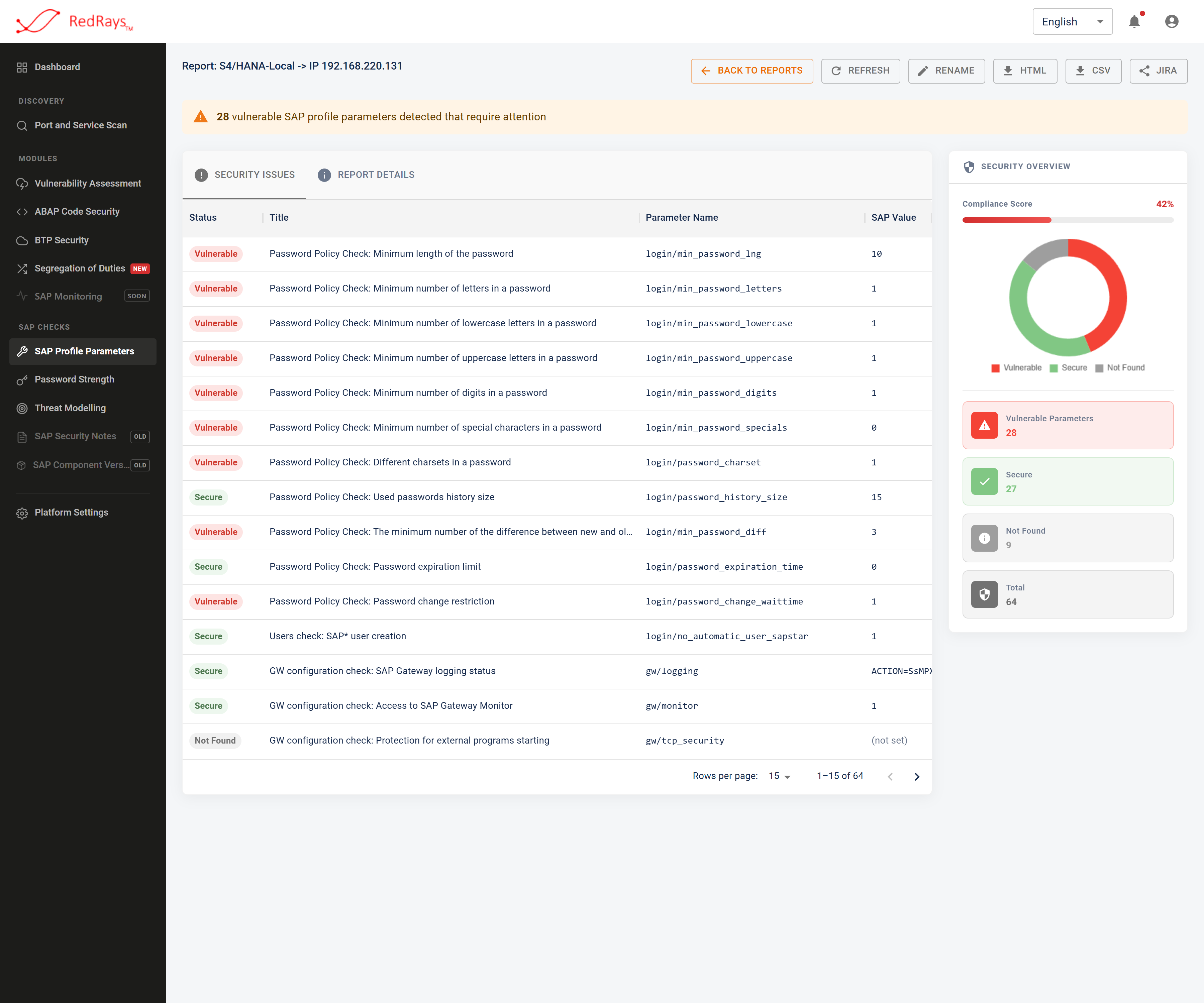
Every parameter in the catalogue gets a row, and a row the system never answered for is marked as unmeasured rather than counted as a pass.
The third state is the one most tools of this kind do not have. It is counted separately, given its own column and its own slice of the report chart, and never added to the passes or to the failures. Not found, not set and zero takes the three blanks apart, because a parameter this release does not have, a parameter that came back empty, and a parameter set to zero look alike in a spreadsheet and mean three different things.
¶ Why is the condition printed next to the value?
Because a verdict whose condition is hidden is one the reader has to take on trust. A finding puts the value the system returned and the condition that judged it in the same frame, so the person reading it can check the arithmetic without access to the ruleset. That is also what makes the catalogue reviewable: a customer who disagrees with an expected value can see it, argue with it, and change it.
¶ What the review does not do
- It does not report a parameter that is not in the catalogue. Everything else the system returns is discarded. A report tells you how much of its own list it filled in; it does not tell you how many parameters the system has.
- It does not say whether a compliant value was set on purpose. SAP reports the profile value and the kernel default separately. The review records the value in force. A setting that is compliant because somebody chose it and one that is compliant because the kernel happens to default that way read the same, and the next kernel upgrade is entitled to withdraw the second.
- It does not rank findings by exploitability. There is no severity score on a parameter check. Findings arrive as a list of equal statements about settings, not as a queue sorted by risk.
- It does not check who is allowed to do anything. No user, no role and no authorisation object is read. Several parameters govern whether an authorisation check runs at all; none of them says whether a given person would pass it. That is segregation of duties analysis.
- It does not check what is listening on the network. No host is probed and no service is fingerprinted. That is the SAP port and service scan.
- It does not check whether SAP Security Notes are applied. A parameter is not a patch. That is vulnerability assessment.
¶ How it fits the other checks
| Question | Where it is answered |
|---|---|
| Is this system configured to behave safely? | This review |
| Is this system missing a published SAP fix? | Vulnerability assessment |
| Do the password rules hold, or do the hashes fall? | SAP password strength testing |
| Can one person do two things nobody should do alone? | Segregation of duties analysis |
| Is there a security defect in the ABAP written here? | ABAP code security scanning |
¶ Which page answers which question?
¶ Frequently asked questions
¶ Does the review change anything on the SAP system?
No. It opens a read-only RFC connection, reads the profile parameters in force, and closes it. Nothing is written, no business data is read, and no transaction is executed on the system.
¶ Where do the results go?
The installation runs on the customer's own infrastructure and the reports stay in it. Findings leave only through an export the customer asks for, such as a downloaded report file or a ticket raised in the customer's own issue tracker. See deployment and where data goes.
¶ How often should profile parameters be reviewed?
After any kernel upgrade, any profile change and any system copy, and otherwise on the cadence your other configuration evidence follows. Each run is stored as its own report, so two dates can be read side by side.
¶ Can we add our own parameters and our own expected values?
Yes. The catalogue is visible in the product and can be extended. A new entry applies to reports taken after it is added and not to reports already taken, which is the honest behaviour but does mean two reports of the same system can cover different lists. Where the recommended values come from explains what that costs.
¶ Is a clean report proof that the system is hardened?
No. It is proof that every parameter in the catalogue that the system returned satisfied its condition. Parameters outside the catalogue were not examined, and parameters the system did not return were not measured at all, which the report states on the row rather than hiding. See what a finding does and does not claim.
Continue with what RZ11 does not tell you, what one parameter check says, the list of security-relevant SAP profile parameters, or a parameter scan against a checklist.