¶ ABAP Scan Reports and Exports
An ABAP scan produces three different things for three different readers: a finding view for the developer who has to change the code, a per-object report that states what was looked at before it states what was found, and machine-readable exports for a build pipeline or another security tool.
They are three views of one run, and which one to hand over depends entirely on who is asking. A developer wants the line and the path. An auditor wants the denominator. A pipeline wants a file it can fail a build on.
¶ What does a developer get?
The finding itself, with everything needed to confirm or reject it without opening SAP:
- the object name, object type and line range
- the analysis service's own description of what was found
- the ABAP source as it was read, with the affected lines marked
- the data path, printed as the source statement and the sink statement
- the recommendation, naming what to change
- the SAP dictionary attributes of the object, including who created it, who last changed it, and whether it is remote-callable
When the code has been changed, a retest reads the object's current source out of the SAP system and analyses it again, so the answer is about the code as it stands rather than the copy the scan stored.
¶ What does an auditor get?
A per-object report over the whole run. Its ordering is the point: it states the number of objects the run covered first, then how many carried nothing, then how many carried findings, then the per-object table with the severity counts.
That order matters because it puts the denominator in front of the result. "One program carried a finding" and "one program of one carried a finding" are different statements, and only the second is evidence. The table below it lists each object with its type, its status, its total, and the count in each severity band.
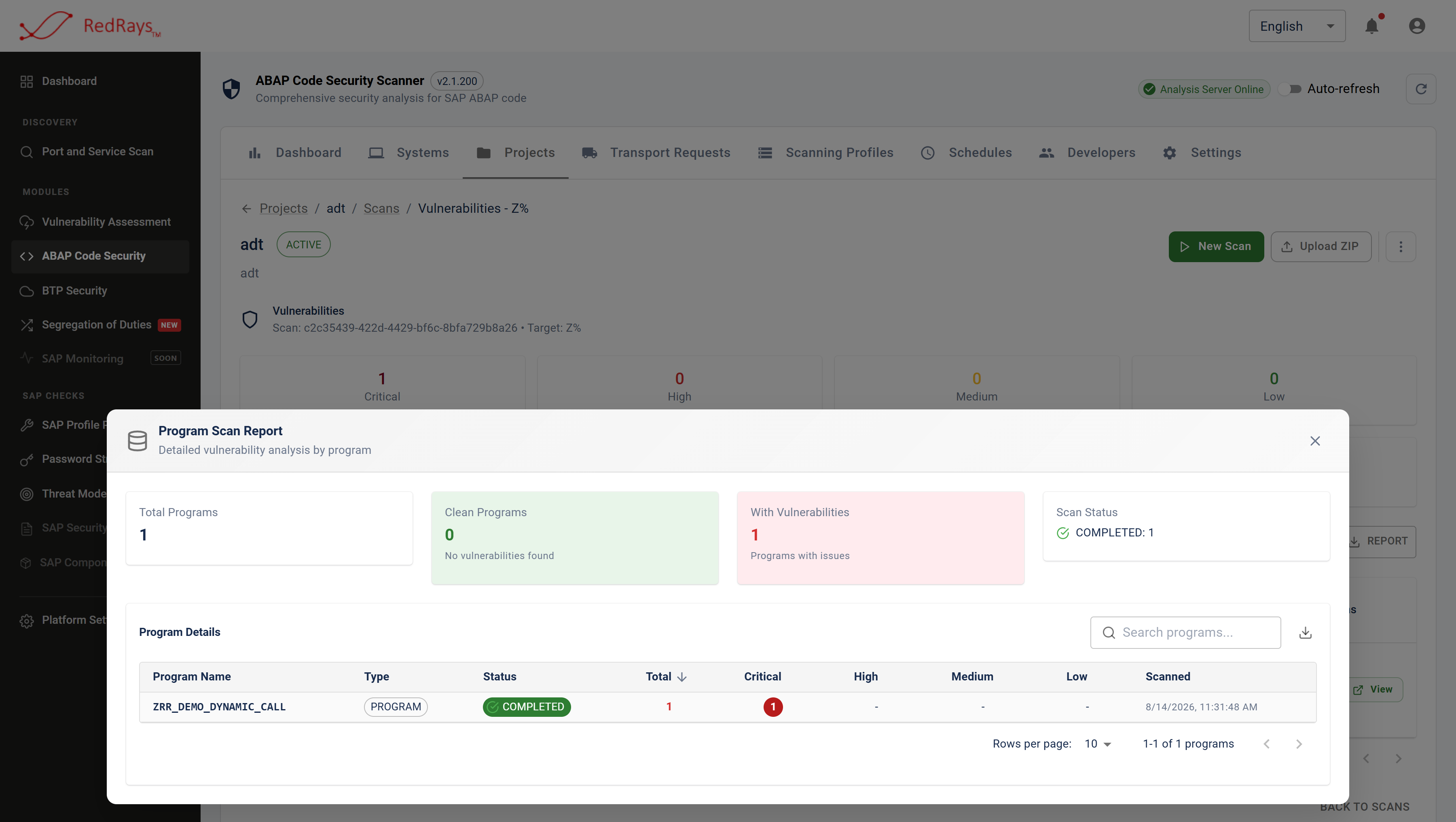
The report puts the denominator in front of the result, which is what turns a count of findings into evidence.
The report is available as a screen and as a workbook, so it can be attached to an audit file as it stands.
¶ What does a pipeline get?
| Format | Shape | Typical use |
|---|---|---|
| XLSX workbook | per-object report, multiple sheets | audit file, management reporting |
| CSV | one row per finding | spreadsheets, ticket import |
| JSON | one record per finding, full fields | custom tooling, dashboards |
| XML | one element per finding | older toolchains and reporting stacks |
| SARIF | the standard static analysis interchange format | pushing results into an application security platform that ingests SARIF |
| Source archive | the stored ABAP of every object in the run | offline review, evidence retention |
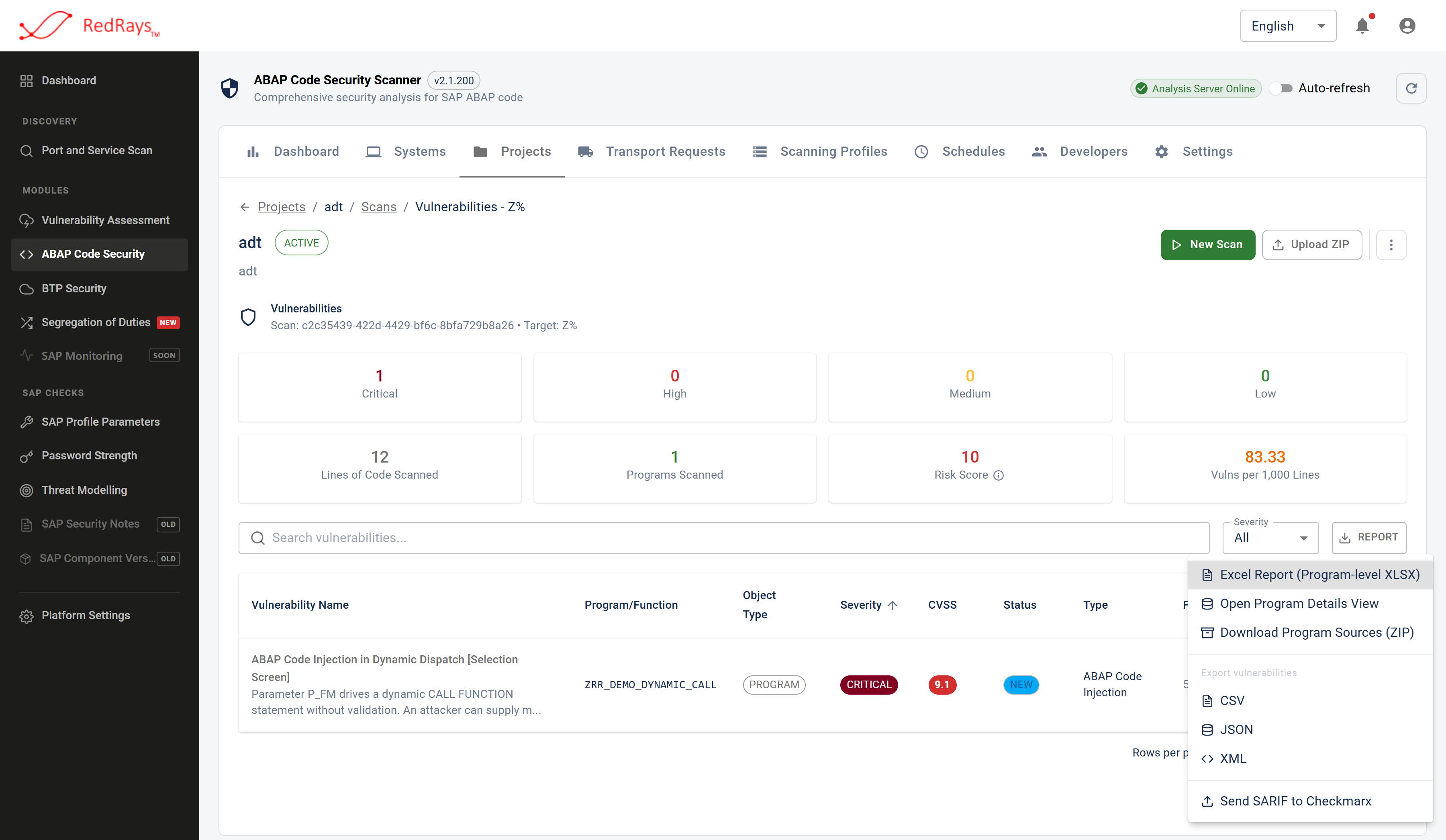
One run, several outputs, so the developer, the auditor and the build pipeline each get the shape they can use.
SARIF is the one to reach for when ABAP findings need to sit beside the rest of an organisation's application security results rather than in a separate SAP silo. The scanner builds SARIF from a run and can post it to an external application security platform that accepts it.
¶ What should a build do with the result?
Two decisions, and it is worth making them explicitly rather than by default:
- What fails a build. A severity threshold is the usual answer, and it should be the same threshold the profile makes reachable. Failing on critical findings while running a profile that includes only critical checks is coherent. Failing on critical findings while running a broader profile means the medium and high results are informational, and somebody has to read them.
- What a passing build claims. A build that passes says the checks that ran found nothing above the threshold, in the objects submitted. It does not say the change is safe. See scan profiles and what clean means.
¶ Limits
- An export is a list of findings, not a statement of scope. The profile that produced a result, and the object and line counts behind it, are recorded with the run. Quote a result together with its run reference, because on its own an export cannot say how wide a question was asked.
- A source archive is customer ABAP on a disk. Exporting the sources of a run puts the code the scan read into a file outside the product's access control. Treat it like source, because it is source.
- Exports carry the current severity and status. Both are editable during triage, so an export reflects the decisions taken up to the moment it was produced rather than what the scan originally assigned.
- Nothing in an export is a rate. A defects-per-thousand-lines figure over a small object is arithmetic extrapolated well past its sample. Read counts, and read them against the object count.
- Exports and reports are permission-gated separately. Being able to see findings and being able to take them out of the product are different rights, and the second one is the one to review.
¶ Frequently asked questions
¶ Can findings go into Jira or ServiceNow?
Through the CSV or JSON export, which carry one record per finding with the object, line range, severity, description and recommendation. There is no built-in ticket integration.
¶ Can we feed ABAP findings into our existing application security platform?
Yes, through SARIF, which is what that format exists for. The scanner can also post a run's SARIF results directly to an external platform that ingests them.
¶ Does the report say which checks ran?
The run records the profile it used. Carry that reference with any result you hand on, because a result screen or an exported file on its own does not restate the scope it was produced under.
¶ Can we export the ABAP source itself?
Yes, as an archive of the source the scan read. It is the code as it stood at scan time, not as it stands in SAP now, and it should be handled with the same care as any source export.
¶ How long are results kept?
As long as the installation keeps them. Scan history and findings live in the customer's own deployment, so retention is the customer's decision rather than a vendor setting.